

Every time a visitor uses your chatbot, a detailed record is created. The Conversations and Leads pages give you full visibility into what users are asking and the contact information they provide.Documentation Index
Fetch the complete documentation index at: https://docs.weeziq.com/docs/llms.txt
Use this file to discover all available pages before exploring further.
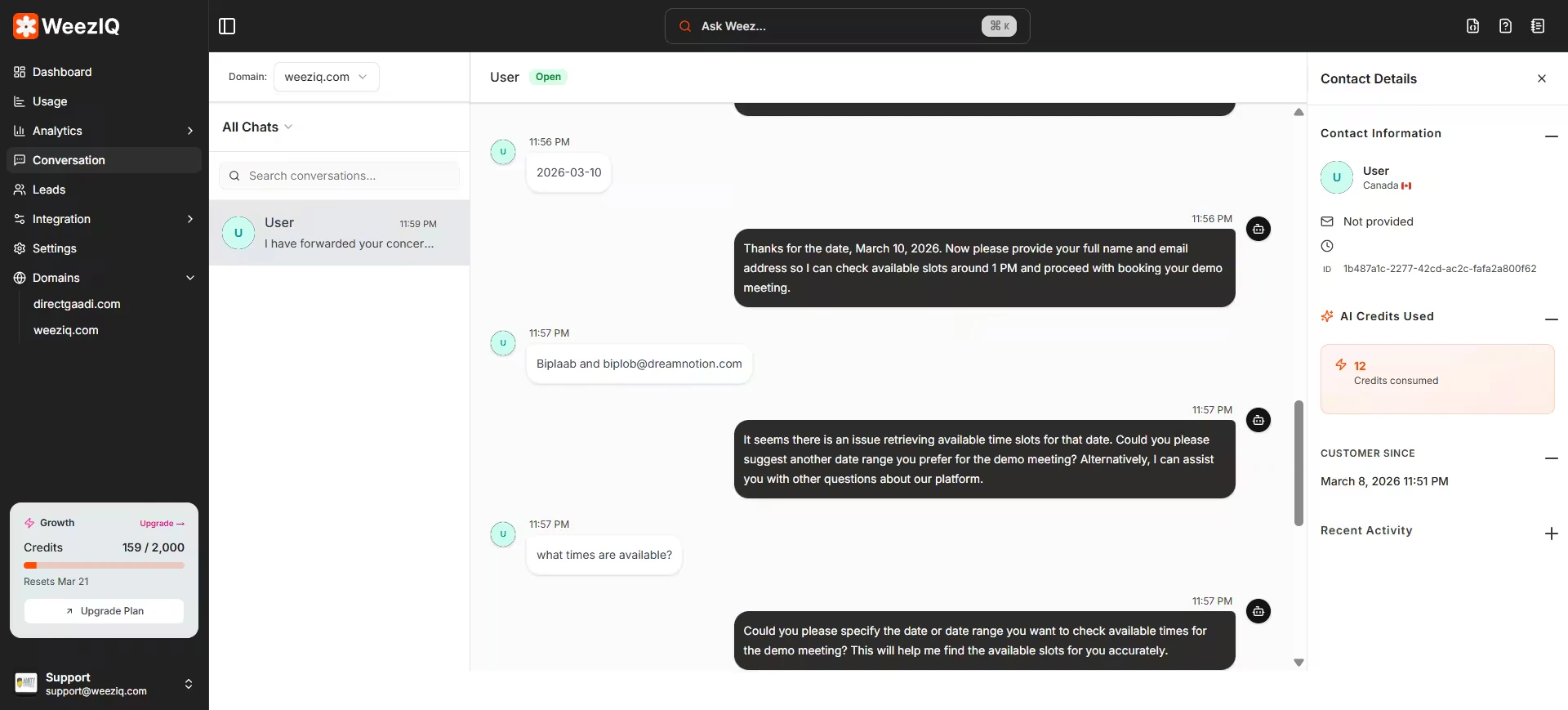
Layout
The Conversations page uses a split-pane layout:- Left Panel: A scrollable list of all chat sessions, organized by domain. Each entry shows the visitor’s name (if captured), the last message, and the timestamp.
- Right Panel: The full transcript of the selected conversation, showing both user messages and AI responses with timestamps.
Filtering and Search
By Domain
View conversations for a specific website using the domain selector.
By Status
Filter by All, Unread, or Expired conversations.
By Search
Search through conversations to find specific topics or messages.
Real-Time Updates
Conversations update in real time using WebSocket connections. If a visitor is actively chatting while you have the Conversations page open, you will see new messages appear instantly without refreshing.